To all my ex-crushes, ex-GFs and one not-so-special-anymore…

I write this post from the bottom of my heart.

I have had my share of crushes and GFs over the years. It is natural to love someone and there is no reason to hide it. But at the same time, you have to understand that there is a time and a place for the world to know about it. For me, the time and the place is now!

Like every student, I had a crush on my teacher. And another teacher. The best part is that both of their names start with S. So let’s call them Mrs. S from now on. (Fortunately, it leads to confusion to my beloved readers :-))

Mrs. S used to come in my dreams and I don’t know why I still remember that dream! It seems like it happened yesterday but the dream is still so fresh in my mind. I don’t know where she is and how she is.

Mrs. S was very fond of me. I was usually in the top 5. But somehow she liked me more than the student who used to get first rank. In fourth standard, I got second rank in the finals. I had gone to collect my report card with my parents and she kissed me on my left cheek. Yippie! I know where she lives and she is doing fine.

No more one-way love stories from school days apart from a couple of F.L.A.M.E.S! #youremember

We will now proceed to the most happening phase in any student life – College. Just to add more confusion to my loved readers, I shall refer to College to mean PUC and B.E.

In college for the first time in my life, I had 3 one-way GFs. But here’s the twist: the one-way was not from my side! My friend suggested to keep nicknames – Pink, White & Diagonal. I could understand Pink and White. But what’s with Diagonal? My friend explained that as mine was a rectangular love story, Diagonal was the farthest from me. Truer words were never explained in such a simple way!

I have already shared with you this incident – Why I Love YouTube!

All of these were mostly puppy love. Once I finished my golden phase of life, I had one true GF. One serious GF. It all started when I was in my early second decade of my life. (sigh… I am in third decade now!) She (Thank God… it was a she… yaaay!) was this gorgeous, sexy-looking girl. It started as an infatuation, remained as an infatuation for a long time and then some. Slowly it graduated from that and I mustered courage again and asked her out for which she readily accepted. The love phase was awesome and like any other BF-GF, we roamed around Bangalore trying our best not to meet people we knew. I have to give credit to myself… I didn’t meet anyone I knew when I was with her. Pat on the back for yours truly! But all this was short-lived and then started the on-off-on-off thingy. It was depressing, really. It was the saddest phase in my life and I consider myself lucky as I didn’t end up in NIMHANS. There were just 2 memorable moments with her – both happened to be on the same day. (wink wink :-)) I don’t where in which part of the world she is now and I don’t intend to know too.

To all my ex-crushes, ex-GFs and one not-so-special-anymore, I really thank you for breaking up with me. My life is perfect without you!

Happy ValENDtines Day!

Posted in Personal | Tagged , , | Leave a comment

Solr – Pre & Post 4.0

Solr is the popular, blazing fast open source enterprise search platform from the Apache Lucene project. Its major features include powerful full-text search, hit highlighting, faceted search, near real-time indexing, dynamic clustering, database integration, rich document (e.g., Word, PDF) handling, and geospatial search. Solr is highly reliable, scalable and fault tolerant, providing distributed indexing, replication and load-balanced querying, automated failover and recovery, centralized configuration and more. Solr powers the search and navigation features of many of the world’s largest internet sites.

The major feature introductions in Solr 4.0 are SolrCloud, Near Real Time Search, Atomic Updates and Optimistic Concurrency. Before getting into the details, first let’s understand how distributed indexing & querying and master-slave index replication worked in Solr 3.6 or earlier.

Solr in AWS: Shards & Distributed Search provides a detailed explanation of what a shard is, initializing shards, indexing documents into shards and performing a distributed search. Learnings from this article are as follows –

  • Solr doesn’t have any logic for distributing indexed data over shards. It is up to you to ensure that the documents are evenly distributed across shards.
  • Performing a distributed search requires you to have knowledge of all the existing shards so that the entire data set can be queried.
  • Both distributed indexing and querying is NOT a transparent process
  • What happens when one of the shards goes down? Is the data incomplete now?

Distributed indexing & searching is a very significant feature, no doubt. But can it be handled better and in a much more transparent way?

Solr in AWS: Master Slave Replication & Mitigation Strategies offers a detailed explanation of what an index replication means, setting it up in master-slave mode and mitigation steps needed when the master fails. Learnings from this article are as follows –

  • Master is the single point of failure (SPOF). Once the master is down, no more writes to the index are possible.
  • Master has no clue of the number of slaves that are present.
  • Absence of a centralized coordination service for maintaining configuration information and providing distributed synchronization leading to inevitable race conditions.
  • Replication is done pull-style which leads to index inconsistencies due to replication lag
  • Nomination of one of the slaves as the new master requires implementation of custom scripts and / or deployment of NFS.
  • What happens when the master goes down and you do not receive any notification?

It is obvious that setting up distributed indexing & searching and master-slave replication is a complex process and requires the presence of a Solr expert.

Do not fret! Enter Solr 4.0 and its state-of-the-art capabilities.

SolrCloud

SolrCloud is the name of a set of new distributed capabilities in Solr. Passing parameters to enable these capabilities will enable you to set up a highly available, fault tolerant cluster of Solr servers. Use SolrCloud when you want high scale, fault tolerant, distributed indexing and search capabilities.

Truth be told – Setting up a sharded, replicated, highly available, fault tolerant SolrCloud cluster takes less than 15 minutes! Ok, enough of the theatrics. Let’s get our hands dirty.

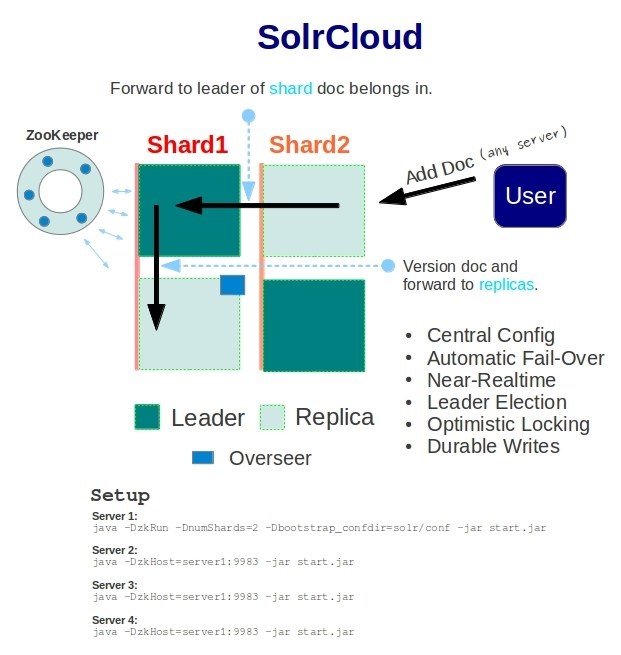
A SolrCloud cluster consists of one or more shards, each having one or more replicas and coordinated by ZooKeeper to facilitate high availability and fault tolerance.

Solr4.0

Figure 1: 2 Shard 2 Replica Architecture

ZooKeeper

ZooKeeper is used as a repository for cluster configuration and coordination – think of it as a distributed file system that contains information about all of the Solr servers. A single ZooKeeper service can handle the cluster but then it becomes SPOF. In order to avoid such a scenario, it is recommended that a ZooKeeper Ensemble, i.e. running multiple ZooKeeper servers in concert, is in action. Every ZooKeeper server needs to know about every other ZooKeeper server in the ensemble, and a majority of servers (called a Quorum) are needed to provide service. For example, a ZooKeeper ensemble of 3 servers allows anyone to fail with the remaining 2 constituting a majority to continue providing service. 5 ZooKeeper servers are needed to allow for the failure of up to 2 servers at a time.

Installing & running ZooKeeper Ensemble

cd /opt
wget http://apache.techartifact.com/mirror/zookeeper/zookeeper-3.4.5/zookeeper-3.4.5.tar.gz
tar -xzvf zookeeper-3.4.5.tar.gz
cd zookeeper-3.4.5
cp conf/zoo_sample.cfg conf/zoo.cfg
vim conf/zoo.cfg
	dataDir=/opt/zookeeper/data
	server.1=<ip>:<quorum_port>:<leader_election_port>
	server.2=<ip>:<quorum_port>:<leader_election_port>
	server.3=<ip>:<quorum_port>:<leader_election_port>
cd /opt/zookeeper/data
vim myid
	1 (or 2 or 3… depending on the server)
/opt/zookeeper-3.4.5/bin/zkServer.sh start
/opt/zookeeper-3.4.5/bin/zkServer.sh stop

Follow the above steps in all the ZooKeeper servers. Refer Clustered (Multi-Server) Setup and Configuration Parameters for understanding quorum_port, leader_election_port and the file myid. We now have a 3-node ZooKeeper Ensemble running!

Installing & running Solr 4.0

cd /opt
wget http://apache.techartifact.com/mirror/lucene/solr/4.0.0/apache-solr-4.0.0.tgz
tar -xzvf apache-solr-4.0.0.tgz 
rm -f apache-solr-4.0.0.tgz
cd /opt/apache-solr-4.0.0/example/
java -Dbootstrap_confdir=./solr/collection1/conf -Dcollection.configName=myconf -DnumShards=2 -DzkHost=<server1_ip>:<client_port>,<server2_ip>:<client_port>,<server3_ip>:<client_port> -jar start.jar
java -DzkHost= DzkHost=<server1_ip>:<client_port>,<server2_ip>:<client_port>,<server3_ip>:<client_port> -jar start.jar

A couple of points worth mentioning –

  • -DnumShards: the number of shards that will be present. Note that once set, this number cannot be increased or decreased without re-indexing the entire data set. (Dynamically changing the number of shards is part of the Solr roadmap!)
  • -DzkHost: a comma-separated list of ZooKeeper servers.
  • -Dbootstrap_confdir, -Dcollection.configName: these parameters are specified only when starting up the first Solr instance. This will enable the transfer of configuration files to ZooKeeper. Subsequent Solr instances need to just point to the ZooKeeper ensemble.

The above command with –DnumShards=2 specifies that it is a 2-shard cluster. The first Solr server automatically becomes shard1 and the second Solr server automatically becomes shard2. What happens when we run a third & fourth Solr instances? Since it’s a 2-shard cluster, the third Solr server automatically becomes a replica of shard1 and the fourth Solr server becomes a replica of shard2. We now have 4-node (2-shard 2-replica) Solr cluster running!

An important point to remember: The first Solr server that joins shard1 is assigned the role of a Leader of the shard1 sub-cluster and subsequent servers that join shard1 are the replicas. All writes happen on the Leader and the same are pushed to the replicas. If the Leader goes down, automatic fail over kicks in and a replica will automatically be promoted to the role of the Leader.

Indexing documents into the cluster

Unlike pre Solr 4.0, the entire indexing process is transparent. Any document write operation can be sent to any shard leader / replica and the indexing module ensures that the document is sent to the correct shard.

The index process is as follows –

  • If an index document request is sent to a shard replica, the same is forwarded to the leader of that shard.
  • If an index document request is sent to a leader of a shard, then the leader first checks if the document belongs to the same shard using MurmurHash3 algorithm.
    • If yes, then the document is written to its transaction log.
    • If no, then the document is forwarded to the leader of the correct shard which in turn writes to its transaction log.

It then transfers the delta of the transaction log to all its replicas. The replicas in turn  update their respective transaction logs and send an acknowledgement to the leader.  Once the leader receives acknowledgements that all the slaves have received the updates, the original index request is responded to.

Performing a distributed search

Unlike pre Solr 4.0, the entire distributed search is completely transparent. You need not know the number of shards nor the number of replicas. All this information is maintained in ZooKeeper.

When a query request is sent to one of the instances, either a leader or a replica, Solr load balances the requests across replicas, using different servers to satisfy each request. SolrCloud can continue to serve results without interruption as long as at least one server hosts every shard. To return just the documents that are available in the shards that are still alive (and avoid a 503 error), add the following query parameter: shards.tolerant=true.

Soft Commit

A hard commit calls fsync on the index files to ensure that they have been flushed to stable storage and no data loss will result from a power failure. It is an expensive operation as it involves disk IO.

A soft commit, introduced in Solr 4.0 to handle NRT search, is much faster as it only makes the index change visible to the searchers but does not call fsync. This is accomplished by writing the changes to the transaction log. Think of it as adding documents to an in-memory writeable segment. As the size of the transaction log increases over time, it is imperative that these are written to disk using hard commit periodically.

Near Real Time Search

The /get NRT handler ensures that the latest version of a document is retrieved. It is NOT designed to be used as full-text search. Instead, its responsibility is the guaranteed return of the latest version of a particular document.

When a /get request is raised by providing an id or ids (a set of id), the search process is as follows –

  • It checks if the document is present in the transaction log
    • If yes, then the document is returned from the transaction log
    • If no, then the latest opened searcher is used to retrieve the document

Atomic Updates

Atomic Updates is a new feature in Solr 4.0 that allows you to update on a field level rather than on a document level (pre Solr 4.0). This means that you can update individual fields without having to send the entire document to Solr with the update fields’ values. Internally Solr re-adds the document to the index with the updated fields. Please note that fields in your schema.xml must be stored=true to enable atomic updates.

Optimistic Concurrency

Optimistic concurrency control is a Solr NoSQL feature that allows a conditional update based on the document _version_. Using optimistic concurrency normally involves a READ-MODIFY-WRITE process. Solr automatically adds a _version_ field to all documents. A client can specify a value for _version_ on any update operation to invoke optimistic concurrency control.

  • If the value of _version_ matches what currently exists in Solr, then the update operation will be successful and a new _version_ value will be set to that document.
  • If the _version_ does not match what currently exists in Solr, then a HTTP error with code 409 (Conflict) will be returned.

FAQ

  1. How are the replicas assigned to shards?
    1. When a new Solr server is added, it is assigned to the shard with the fewest replicas, tie-breaking on the lowest shard number.
  2. Why should I specify all the ZooKeepers for the parameter –DzkHost?
    1. TCP connections are established between the Solr instance and the ZooKeeper servers. When a ZooKeeper server goes down, the corresponding TCP connection is lost. However, other existing TCP connections are still functional and hence this ensures fault tolerance of the SolrCloud cluster even when one or more ZooKeeper servers are down.
  3. What is a transaction log?
    1. It is an append-only log of write operations maintained by each node. It records all write operations performed on an index between two commits. Anytime the indexing process is interrupted, any uncommitted updates can be replayed from the transaction log.
  4. When does the old-style replication kick in?
    1. When a Solr machine is added to the cluster as a replica, it needs to get itself synchronized with the concerned shard. If more than 100 updates are present, then an old-style master-slave replication kicks off. Otherwise, transaction log is replayed to synchronize the replica.
  5. How is load balancing performed on the client side?
    1. Solr client uses LBHttpSolrServer. It is a dumb round-robin implementation. Please note that this should NOT be used for indexing.
  6. What will happen if the entire ZooKeeper ensemble goes down or quorum is not maintained?
    1. ZooKeeper periodically sends the current cluster configuration information to all the SolrCloud instances. When a search request needs to be performed, the Solr instance reads the current cluster information from its local cache and executes the query. Hence, search requests need not have the ZooKeeper ensemble running. Please bear in mind that any new instances that are added to the cluster will not be visible to the other instances.
    2. However, a write index request is a bit more complicated. An index write operation results in a new Lucene segment getting added or existing Lucene segments getting merged. This information has to be sent to ZooKeeper. Each Solr server must report to ZooKeeper which cores it has installed. Each host file is of the form host_version. It is the responsibility of each Solr host/server to match the state of the cores_N file. Meaning, each Solr server must install the cores defined for it and after successful install, write the hosts file out to ZooKeeper. Hence, an index write operation always needs ZooKeeper ensemble to be running.
  7. Can the ZooKeeper cluster be dynamically changed?
    1. ZooKeeper cluster is not easily changed dynamically but is part of their roadmap. A workaround is to do a Rolling Restart.
  8. Is there a way to find out which Solr instance is a leader and which one is a replica?
    1. Solr 4.0 Admin console shows these roles in a nice graphical manner.
  9. How much time does it take to add a new replica to a shard?
    1. For a shard leader index size of 500MB, an m1.medium EC2 cold-start replica instance takes about 30 seconds to synchronize its index with the leader and become part of the cluster.
  10. Is it possible to ensure that the SolrCloud cluster is HA even when an entire AZ goes out of action?
    1. When an entire AZ is down and the cluster is expected to be running successfully, the simplest and recommended approach is to have all leaders in one AZ and replicas in other AZs with the ZooKeeper ensemble spanning across AZs.

References

  1. http://wiki.apache.org/solr/SolrCloud
  2. http://zookeeper.apache.org/
  3. http://wiki.apache.org/solr/SolrReplication
  4. https://pristinecrap.com/2013/01/12/solr-in-aws-shards-distributed-search/
  5. http://wiki.apache.org/solr/UpdateXmlMessages
  6. http://wiki.apache.org/solr/Atomic_Updates
  7. http://yonik.com/solr/realtime-get/
  8. http://yonik.com/solr/optimistic-concurrency/
Posted in Technical | Tagged , , , , , , , , | 5 Comments

Solr in AWS: Master Slave Replication & Mitigation Strategies

Solr is the popular, blazing fast open source enterprise search platform from the Apache Lucene project. Its major features include powerful full-text search, hit highlighting, faceted search, near real-time indexing, dynamic clustering, database integration, rich document (e.g., Word, PDF) handling, and geospatial search. Solr is highly reliable, scalable and fault tolerant, providing distributed indexing, replication and load-balanced querying, automated failover and recovery, centralized configuration and more. Solr powers the search and navigation features of many of the world’s largest internet sites.

A single Solr server can handle only a certain number of requests without affecting performance. In such, not so uncommon, scenarios it is best to set up a Solr master-slave cluster so that the load can be balanced effectively. Master usually takes up the task of index updates whereas the slaves’ responsibilities are to poll the master for updates and handle the ever-increasing search requests.

This article explains the index replication that works over HTTP and how to set it up using Solr 3.6. Let’s get started!

Index Replication

A master-slave replication includes both index replication and (an optional) configuration files replication. Index replication, as the phrase indicates, is the replication of Lucene index from the master to the slaves. The slaves poll the master for any updates and the master sends a delta of the index so that everyone can be in sync.

Setting up master-slave replication

Open the file solrconfig.xml and add the following –

<requestHandler name="/replication" class="solr.ReplicationHandler">
   <lst name="master">
      <!--Replicate on 'startup' and 'commit'. 'optimize' is also a valid value for replicateAfter. -->
      <str name="enable">${enable.master:false}</str>
      <str name="replicateAfter">startup</str>
      <str name="replicateAfter">commit</str>
      <str name="commitReserveDuration">00:00:10</str>
   </lst>
   <lst name="slave">
      <str name="enable">${enable.slave:false}</str>
      <str name="masterUrl">http://master_server_ip:solr_port/solr/replication</str>
      <str name="pollInterval">00:00:20</str>
   </lst>
</requestHandler>

Note that ${enable.master:false} and ${enable.slave:false} are false indicating that currently this machine is neither set up as a master nor a slave. These settings HAVE to be overridden by specifying the values in the file solrcore.properties which is located under the conf directory of each core’s instance directory.

On the master server, open the file solrcore.properties and add the following –

enable.master=true
enable.slave=false

On the slave server, open the file solrcore.properties and add the following –

enable.master=false
enable.slave=true

Fire up these machines and you have a master-slave Solr cluster ready!

Repeater

A master may be able to serve only so many slaves without adversely affecting performance. Some organizations have deployed slave servers across multiple data centers. If each slave downloads the index from a remote data center, the resulting download may consume too much network bandwidth. To avoid performance degradation in cases like this, you can configure one or more slaves as repeaters. A repeater is simply a node that acts as both a master and a slave. (enable.master=true
enable.slave=true)

Note: Be sure to have replicateAfter ‘commit’ setup on repeater even if replicateAfter is set to optimize on the main master. This is because on a repeater (or any slave), only a commit is called after index is downloaded. Optimize is never called on slaves.

As with our lives, nothing is certain in the lives of machines too! Any machine can go down at any time and there is nothing we can do about it except to plan for such inevitable cases and have a mitigation strategy in place.

Mitigation Strategies when master is down

Since master-slave replication is done pull-style, there are always inconsistencies with the indices of the master and the slaves. When some loss of updates are acceptable –

Mitigation Plan 1: Every machine is either a master or a slave and not BOTH

1. Nominate one of the slaves as master
2. Stop the Solr server on the new master
3. Change the solrcore.properties to promote it as master.
4. Start the Solr server of new master
5. Detach the EIP from the failed master and associate with the new nominated master.
6. That’s it!

Mitigation Plan 2: Every machine is both master and slave (Concept of Repeater)

1. Nominate one of the instances as master
2. Detach the EIP from the failed master and associate with the new nominated master.
3. That’s it!

In each of the mitigation plans, the first step is to nominate a slave. The obvious question arises – How do we decide which slave is the best-fit?

We have to choose that slave whose index is closest to master. To carry out this operation, use the LukeRequestHandler (enabled by default) and query the version parameter. This parameter shows the timestamp in milliseconds of the last index operation. Pick the slave which satisfies the following conditions –

1. Retrieve the version attribute on the master from S3. (Aside: Since the master is down currently, there is no way you can get the version of the master. Hence, you have to query and store the master version in S3 periodically when the master was running!)
2. Query the version on all solr slaves.
3. Among the slaves, pick the slave that has the highest version. That is the best nomination.
4. As a double check, check that the nominated slave’s version is closest or equal to that of the master (Replicating a master index means copying index as-is from the master to slaves. That’s why lastModified and version are the same on a slave once replication is successful. This is the reason why slave version can never be greater than that of the master)

However in production environments, any loss of updates is not acceptable and hence more robust mitigation plans need to be in place.

Mitigation Plan 1

1. Detach EBS from master and mount to any slave in the same AZ. (This is because of EBS restriction)
2. Reattach EIP from master to the slave
3. That’s it!

Mitigation Plan 2

1. Use GlusterFS as network file system. Index is automatically replicated across AZ and regions.
2. Reattach EIP to the secondary master.
3. That’s it!

Mitigation Plan 3

1. Use SolrCloud feature of Solr 4.0!

References

1. http://wiki.apache.org/solr/SolrReplication

Posted in Technical | Tagged , , , , , , | 1 Comment

Amazon CloudSearch & Apache Solr 3.6

With the advent of the “Information Age”, massive amounts of data & information is being added into our lives every second. Gone are the days of MB & GB. Today everything is in the order of TB and PB. Raw data is worthless unless meaningful information can be extracted out of it & made searchable so that end users derive value.

Search plays the most integral role in today’s websites and online applications. Search has the power to make or break a business. Hence, sufficient time has to be spent to make search a meaningful experience to the users.

We will look at David & Goliath of search technologies – Amazon CloudSearch & Apache Solr.

Amazon CloudSearch is a “fully-managed search service in the cloud that allows customers to easily integrate fast and highly scalable search functionality into their applications. It seamlessly scales as the amount of searchable data increases or as the query rate changes, and developers can change search parameters, fine tune search relevance, and apply new settings at any time without having to upload the data again. It supports a rich set of features including free text search, faceted search, customizable relevance ranking, configurable search fields, text processing options, and near real-time indexing.

Apache Solr is a “popular, blazing fast open source enterprise search platform from the Apache Lucene project. Its major features include powerful full-text search, hit highlighting, faceted search, dynamic clustering, database integration, rich document (e.g., Word, PDF) handling, and geospatial search. Solr is highly scalable, providing distributed search and index replication.”

First, let’s compare these two search technologies with respect to their feature set –

Breed

Apache Solr is completely open source. It is written entirely in Java and uses Lucene under the hood. However, Amazon CloudSearch is a proprietary creation and is based on Amazon’s A9 technology.

Setup Effort

Considerable time & effort is needed to configure Apache Solr and get it up & running. It includes tasks such as Solr download, knowledge of Java, configuration of environment variables, deploying it in a server, understanding the commands needed to start / stop / index the Solr server, applying patches and upgrading to newer versions.

In contrast, Amazon CloudSearch is a fully managed search service in the cloud. You can set it up and start processing queries in less than an hour with a few clicks in the AWS Management Console. You don’t need to worry about running out of disk space or processing power.

Multilingual Support

Apache Solr has multilingual support. Custom analysers and tokenizers have to be written and plugged in. Also, the recommended approach is to have a multi-core architecture with each core addressing one language. But Amazon CloudSearch currently supports only English for tokenizing words in the index.

This is a good-to-have feature but cannot be seen as a critical one.

Scaling

Scaling is an important design consideration for high volume / high growth architectures. Scaling can be done in two ways: scale-up & scale-out. Scale-up is the process of migrating from a small instance to a larger instance whereas scale-out is the process of spawning multiple instances. Refer Figure 1 below.

Apache Solr has scaling support but it is a manual process. When the search traffic increases beyond the threshold of a particular server, we have to manually spawn new Solr servers, transfer the index, auto-warm the caches and re-route the search queries to point to the new Solr servers. It is an involved process and needs an expert to get it done right.

An expert Solr admin is needed to keep a close watch on the performance of the Solr servers. Solr provides an admin interface, which has information regarding documentCache, filterCache, resultCache and statistics such as cache hit rate, cache lookups, cache hit ratio and cache size. Observing these metrics, the Solr admin has to decide on scaling the Solr server. One of the signals that an admin uses to make this decision is to have a look at the cache hit ratio. If this metric is low, then it means that the cache is not able to serve a majority of Solr search requests.  The admin then proceeds to increase the cache size (i.e. scale-up) so that searches will be quicker. Similarly when a scale-up is not possible, scale-out comes in handy. But scale-out is not as easy an operation as scale-up. As you will see later in this article, scale-out involves partitioning the index and performing a distributed search. The admin needs to be careful when partitioning the index (as it usually leads to the re-index of the entire data set) and search queries have to be modified to support the presence of multiple indices across distributed Solr servers. Manual scaling is a strenuous task, no doubt.

As Amazon CloudSearch is a fully managed search service, it scales up and down seamlessly as the amount of data or query volume increases. Amazon CloudSearch determines the size and number of search instances required to deliver low latency, high throughput search performance. When a search instance reaches over 80% CPU utilization, CloudSearch scales up your search domain by adding a search instance to handle the increased traffic. Conversely, when a search instance reaches below 30% CPU utilization, CloudSearch scales down your search domain by removing the additional search instances in order to minimize costs. This is one of the most important points in favour of Amazon CloudSearch.

In today’s information age, scaling (along with index partitioning and replication) is considered as a must-have feature.

Partitioning the Index

When it is not possible to store the data in its entirety on a single server, we have to partition the index and store the part-indices in separate servers. This is also known as sharding.

Apache Solr supports partitioning the index but it is a manual process. When performed manually, it is not a completely transparent operation. Solr doesn’t have any logic for distributing indexed data over shards. Then when querying for data, you supply a shards parameter that lists which Solr shards to aggregate results from. Lastly, every document needs a unique key (ID), because you are breaking up the index based on rows, and these rows are distinguished from each other by their document ID.

uniqueId.hashCode() % numServers determines which server a document should be indexed at. The ability to search across shards is built into the query request handlers. You do not need to do any special configuration to activate it. In order to search across shards, you would issue a search request to Solr, and specify in a shards URL parameter a comma delimited list of all of the shards to distribute the search across. You can issue the search request to any Solr instance, and the server will in turn delegate the same request to each of the Solr servers identified in the shards parameter. The server will aggregate the results and return the standard response format. A sample distributed search URL will be of the form –

http://localhost:8983/solr/select?shards=localhost:8983/solr,localhost:7574/solr&indent=true&q=ipod+solr

Amazon CloudSearch, being a fully managed search service, automatically partitions the index as your data volume grows. It will partition the index across multiple search instances. Conversely, when your data volume shrinks, it will fit your data in one index.

Figure 1: CloudSearch Scaling showing index partition & replication


Replication of Index

Replication of index is used to handle high volumes of search traffic.

Apache Solr has the support to replicate the index. But it is a manual process and includes spawning new instances and configuring them to enable replication between the servers. A replication handler has to be configured on both master and slave machines. On the master, you have to specify the replicateAfter values and on the slave you have to set the fully qualified URL of the master replication handler for the attribute masterUrl. If at any time the URL of the master changes, then all the slaves have to be stopped to make the necessary changes and restarted again.

Amazon CloudSearch automatically scales your search domain to meet your traffic demands. As your traffic increases beyond the processing capacity of each search instance, the partition is replicated to provide additional capacity.

Faceted Search

Faceting allows you to categorize your results into sub-groups, which can be used as the basis for another search. In recent times, faceting has gained popularity by allowing users to narrow down search results in an easy-to-use and efficient way.

Faceting is best explained with the help of a picture (See Figure 2 below). As you can see, a search for “java programming” results in a lot of hits. Observe on the left side of the figure. You can clearly see that the search resulted in 3 facets (or sub-groups) using which you can narrow down your search. For example: if you click on “PDF” in the “Format” facet (see “Facet 2” in the figure), the search query now essentially means “java programming AND only pdf format”, thereby narrowing down the search space eventually leading you to better and convenient results. You can also observe that each member of a facet is accompanied by a number called Facet Count. In the “Format” facet, you can see “PDF (14)” which means that there are 14 “java programming” results in PDF format. The important aspect of facets is that as you go deeper using facets, the resultant search space is vastly reduced and hence the search will be considerably faster.

Both Apache Solr and Amazon CloudSearch allows the user to perform faceting with minimal effort.

 
Figure 2: Faceted Search

Field Weighting / Boosting

Field Weighting is a process of assigning different prominences to the same word when present in different places in a document. For example when the phrase “Harry Potter” is present in the title of a document, it is ranked higher than when the same phrase is present in the References section of a document.

Both Apache Solr and Amazon CloudSearch allows field boosting with minimal effort.

“Did you mean…” feature

One of the better ways to enhance the search experience is offering spelling corrections. This is sometimes presented at the top of search results with such text as “Did you mean …”. Many a times, a user might not know the correct spelling thus leading him to undesired results. Such a feature would vastly reduce users’ time and effort. It is sad when businesses deliberately skip this feature in order to show increased search traffic in their monthly / annual term sheets.

Apache Solr supports this with the Spellcheck search component. The recommended approach is to build a word corpus based on the index principally because your data will contain proper nouns and other words not present in a general-purpose dictionary.

Unfortunately, Amazon CloudSearch has no support for “Did you mean…” feature.

Autosuggest

A popular feature of most search applications is the auto-suggest feature where, as a user types their query into a text box, suggestions of popular queries are presented. The suggestions list is refined as additional characters are typed in. If you think about it for a minute, you will realize that this feature is even better than a “Did you mean…” feature.

Apache Solr has the support for autosuggest. It can be facilitated in many ways – NGramFilterFactory, EdgeNGramFilterFactory or TermsComponent. When used in conjunction with jQuery, it becomes a very powerful autosuggest experience for the user.

Amazon CloudSearch has no support for autosuggest feature.

Geospatial Search

Consider the following example – when a user performs a search for “Starbucks”, the search engine must show the nearest outlet based on the user’s current location. Location-aware search will always produce significantly better results and helps the user in finding the information more effectively and efficiently. This use-case signifies the importance of Geospatial search. In today’s on-the-go world, it is a must-have feature as it is a win-win situation for both users and businesses.

Apache Solr supports geospatial search through the implementation class solr.LatLonType. Actions such as sorting the results by distance and boosting documents by distance can be performed.

Amazon CloudSearch has a very limited geospatial search feature set. As of now, CloudSearch has the capability to return documents within a specific area. Missing features include sorting by geographical distance and faceting by distance.

“Find Similar” feature

This suggests similar records based on a particular record. It is similar to the “Find Similar” feature used by popular search engines. It is more common for applications to request it to be performed on just one document when a user requests it, which occurs at some point after a search. E-commerce sites benefit from this feature as research suggests that users typically compare products before making a transaction and are likely to buy a product which is better & hence slightly expensive than what they had initially intended to buy.

Apache Solr implements this using MoreLikeThisHandler or MoreLikeThisComponent.

Amazon CloudSearch currently does not support this feature.

Rich Documents

Support for rich documents (HTML, PDF, Word, etc.) is an essential feature of a search server. Data & information will be in different formats and it would be foolish to expect it only in certain formats. It is best if search servers provide an intuitive interface for ETL operations and natively support this feature.

Apache Solr has support for rich document parsing & indexing using Apache Tika.

Amazon CloudSearch expects data to be in Search Data Format (JSON & XML) and hence we need to use AWS Console or command line tools (cs-generate-sdf)  to convert the rich text to sdf format.

Customizations

Specific features need not be supported natively because there might not be sufficient demand for them. In such cases, customizations play an important role. It is really a good-to-have feature as different businesses have different requirements and they would need the capability to customize appropriately to suit their needs.

Amazon CloudSearch, being a proprietary creation, does not allow for any customization either through plugin integration or via extending functionalities.

Apache Solr, being open source, allows of customizations of analysers, tokenizers, indexers, query analysis and the like through plugins and via extending the code base.

Having seen the differences between these two search technologies in terms of their feature set, let’s us now compare them with respect to the production environments and fitment –

Increasing / Decreasing / Spike Traffic

Scaling Apache Solr is a manual process and an admin has to spawn new instances, having a close look on the traffic patterns, well in advance so that traffic requests are not dropped.

However, Amazon CloudSearch is a fully managed service and hence no human intervention is needed for scaling. As mentioned earlier, when a search instance reaches over 80% CPU utilization, CloudSearch scales up your search domain by adding a search instance to handle the increased traffic. Conversely, when a search instance reaches below 30% CPU utilization, CloudSearch scales down your search domain by removing the additional search instances in order to minimize costs.

Support for protocols

Both Amazon CloudSearch and Apache Solr support HTTP & HTTPS. Amazon CloudSearch supports HTTPS and includes web service interfaces to configure firewall settings that control network access to your domain. The same but manual process is recommended for Solr too.

Algorithms

Apache Solr has many algorithms including cache implementations such as LRUCache and FastLRUCache. Solr, being open source, can be extended by adding our own algorithms. Since Amazon CloudSearch is proprietary, neither is there information on the algorithms being used nor can they be extended. But please bear in mind that the default CloudSearch algorithms will suffice for most applications.

High Availability

Amazon CloudSearch, like other AWS components, is a highly-available service. It completely automates the time consuming tasks of managing and scaling it. But in the case of Apache Solr, the high-availability has to be built manually which is a strenuous task.

Cost

Consider a sample e-commerce business: 100 MB of search data is present in their servers. Search traffic is likely to be 100,000 requests per day. 50 batch uploads per day, where each batch contains 1000 1 KB documents. Their entire index has to be re-built 4 times every month.

Based on the above requirements, cost of running Amazon CloudSearch 24 / 7 will be close to $87. The costs will definitely rise as the data and search traffic increases since larger and more search instances will be spawned to meet the growing needs. The plus side, however, is that all the managing and scaling tasks are automated.

Running Apache Solr on existing servers will have no additional cost when the deployments are in the small-to-medium range. Since there is no such thing called a free lunch, additional efforts & time will be spent in setting up high availability and scaling.

Few Limitations of CloudSearch

  • Available only in US East region
  • It can scale up to a maximum of 50 instances and partition up to 10 instances. Further scaling is likely on prior approval from AWS team
  • The maximum batch size is 5 MB and the maximum document size is 1 MB
  • Stopwords, synonyms dictionary size is limited

Apache Solr is a highly stable product with a rich feature set and high profile deployments but requires significant human effort to scale and manage it. Amazon CloudSearch is still in its infancy and has a lot of catching-up to do. But the most important benefit is that managing and scaling is completely automatic. It has a lot of promise and we are eagerly awaiting future enhancements!

Posted in Technical | Tagged , , , , | 2 Comments

Hive – A Petabyte Scale Data Warehouse using Hadoop

Web has been growing rapidly in size as well as scale during the last 10 years and shows no signs of slowing down. Statistics shows us that every year more data is produced than all of the previous years combined. Apache Hadoop, inspired by Google’s MapReduce and Google File System (GFS) papers, is a framework that allows for the distributed processing of such large data sets across clusters of machines. Hadoop Distributed File System (HDFS) is the primary storage system used by Hadoop applications. HDFS creates multiple replicas of data blocks & distributes them on compute nodes throughout a cluster to enable reliable, extremely rapid computations.

Using Hadoop was not easy for end users, especially for the ones who were not familiar with MapReduce framework. End users had to write map/reduce programs for simple tasks like getting raw counts or averages. Hadoop lacked the expressibility of popular query languages like SQL and as a result users ended up spending hours (if not days) to write programs for typical analysis.

Enter Hive!

Apache Hive is a data warehouse infrastructure built on top of Hadoop for providing data summarization, query and analysis. While initially developed by Facebook, Apache Hive is now used and developed by other companies.

Hive was created to make it possible for analysts with strong SQL skills (but meager Java programming skills) to run queries on the huge volumes of data to extract patterns and meaningful information. It provides an SQL-like language called HiveQL while maintaining full support for map/reduce.

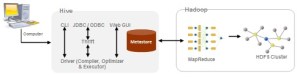
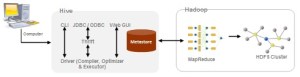
A HiveQL statement is submitted via the Command Line Interface (CLI), the web UI or an external client using the Apache Thrift, ODBC or JDBC interfaces. The Driver first passes the query to the Compiler where it goes through the typical parse, type check and semantic analysis phases, using the metadata stored in the Metastore. An optimized plan in the form of a directed acyclic graph of map-reduce tasks and HDFS tasks is generated. The Execution Engine then executes these tasks in the order of their dependencies, using Hadoop. In short, any HiveQL query is divided into MapReduce tasks which run on the robust Hadoop framework.

Hive has access to files stored either directly in HDFS or in other data storage systems such as HBase. HBase tables can be accessed as if they were native Hive tables.  As a result, a single Hive query can perform complex operations such as join, union, and aggregation across combinations of HBase and native Hive tables. But the recommended approach is to pump the data from HBase (or any other storage) into Hive and then analyze it there. The benefit is 2-fold: (a) once the data is in Hive, queries against it will typically run faster (since Hive is optimized for warehousing) and (b) no risk of excessive load originating from cluster nodes onto the external storage system

Loading bulk data into Hadoop from production systems or accessing it from map-reduce applications running on large clusters can be a challenging task. Transferring data using scripts is inefficient and time consuming. How do we efficiently move data from an external storage into Hive? Meet Apache Sqoop. Sqoop allows easy import and export of data from structured data stores such as relational databases, enterprise data warehouses, and NoSQL systems. Using Sqoop, you can provision the data from an external system on to HDFS, and populate tables in Hive and HBase. The dataset being transferred is sliced up into different partitions and a map-only job is launched with individual mappers responsible for transferring a slice of this dataset.

Posted in Technical | Tagged , , , , | Leave a comment

Hive for Retail Analysis

People always look for convenience! In the early 20th century, retail industry was still in its infancy taking baby steps across Europe and North America. But the latter half of the 20thcentury saw the emergence of the hypermarket and the supermarket as they truly simplified the all-in-one-stop shopping experience.

Retail industry today is big business and will continue to remain so for the foreseeable future. Recent estimates put world-wide retails sales at USD 7.5 trillion. Wal-Mart has been the leader at the global stage since its inception. The world’s top 5 retailers are Wal-Mart (USA), Carrefour (France), Royal Ahold (The Netherlands), Home Depot (USA) & Kroger (USA).

In India, retail industry is growing at a rapid pace. Major Indian retailers in this league include Future Group, Reliance Industries, Tata Group and Aditya Birla Group.

One of the retail groups, let’s call it BigX in this article, wanted their last 5 years semi- structured dataset to be analyzed for trends and patterns. Let us see how they can solve their problem using Hadoop.

About BigX

BigX is a chain of hypermarket in India. Currently there are 220+ stores across 85 cities and towns in India and employs 35,000+ people. Its annual revenue for the year 2011 was USD 1 Billion. It offers a wide range of products including fashion and apparels, food products, books, furniture, electronics, health care, general merchandise and entertainment sections.

One-third of their stores have daily sales of USD 25K+. The remaining two-thirds have daily sales of USD 14K+ and USD 10K+. On an average, 1200+ customers walk in and purchase products from each of these stores daily.

Problem Scenario

  • One of BigX log datasets that needs to be analyzed was approximately 12TB in overall size and holds 5 years of vital information in semi structured form.
  • Traditional business intelligence (BI) tools are good up to a certain degree, usually several hundreds of gigabytes. But when the scale is of the order of terabytes and petabytes, these frameworks become inefficient. Also, BI tools work best when data is present in a known pre-defined schema. The particular dataset from BigX was mostly logs which didn’t conform to any specific schema.
  • It took around 12+ hours to move the data into their Business Intelligence systems bi-weekly. BigX wanted to reduce this time drastically.
  • Querying such large data set was taking too long

Solution

This is where Hadoop shines in all its glory as a solution! Let us see how Hadoop was used to solve this problem.

Since the size of the logs dataset is 12TB, at such a large scale, the problem is 2-fold:

Problem 1: Moving the logs dataset to HDFS periodically

Problem 2: Performing the analysis on this HDFS dataset

We had options like Sqoop & Flume when we need to move the dataset into HDFS. Since logs are unstructured in this case, Sqoop was of little or no use. So Flume was used to move the log data periodically into HDFS. Once the dataset is inside HDFS, Hive was used to perform various analyses.

Let us see the overall approach in detail below –

Problem 1: How Flume solved the data transfer problem?

Flume is a distributed, reliable, and available service for efficiently collecting, aggregating, and moving large amounts of log data. It has a simple and flexible architecture based on streaming data flows. The primary use case for Flume is as a logging system that gathers a set of log files on every machine in a cluster and aggregates them to a centralized persistent HDFS store.

Sample Architecture of Flume Implementation is illustrated below –

 
Figure 1: Flume Architecture

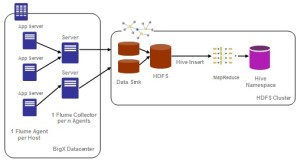
Flume’s typical dataflow is as follows: A Flume Agent is installed on each node of the cluster that produces log messages. These streams of log messages from every node are then sent to the Flume Collector. The collectors then aggregate the streams into larger streams which can then be efficiently written to a storage tier such as HDFS.

Logs from all the nodes can be sent into HDFS on a real-time / daily / weekly / monthly basis. We chose to send certain logs bi-weekly mainly because of the analytical aspect of the requirement and hence daily basis was not warranted in this regard.

Problem 2: Analysis using Hive

Hive is a data warehouse infrastructure built on top of Hadoop for providing data summarization, query and analysis. It provides an SQL-like language called HiveQL and converts the query into MapReduce tasks.

Sample Architecture of Hive Implementation is illustrated below –

Figure 2: Hive Architecture

Hive uses “Schema on Read” unlike a traditional database which uses “Schema on Write”. Schema on Write implies that a table’s schema is enforced at data load time. If the data being loaded doesn’t conform to the schema, then it is rejected. This mechanism might slow the loading process of the dataset usually, Whereas Schema on Read doesn’t verify the data when it’s loaded, but rather when a query is issued. For this precise reason, once the dataset is in HDFS moving it into Hive controlled namespace is usually instantaneous. Hive can also perform analysis on dataset in HDFS or local storage. But the preferred approach is to move the entire dataset into Hive controlled namespace (default location – hdfs://user/hive/warehouse) to enable additional query optimizations.

While reading log files, the simplest recommended approach during Hive table creation is to use a RegexSerDe. It uses regular expression (regex) to serialize/deserialize. It deserializes the data using regex and extracts groups as columns. It can also serialize the row object using a format string.

Caveats:

  • With RegexSerDe all columns have to be strings. Use “CAST (a AS INT)” to convert columns to other types.
  • While moving data from HDFS to Hive, do not use the keyword OVERWRITE

Overall Solution Architecture using Flume + Hive

Below figure shows the overall solution architecture implemented for this problem –

  • Flume was used to collect and transfer log files to HDFS
  • Hive was used for analysis
Figure 3: Flume + Hive Architecture

The merchandize details, user information, time of transaction, area / city / state information, coupon codes (if any) , customer data and other related details were collected and aggregated from various backend servers. Flume was installed on these backend servers to transfer the various log files into HDFS. Flume was configured to transfer data on a bi-weekly basis in this case.

As mentioned earlier, the dataset to be analyzed was 12TB. Using the Hadoop default replication factor of 3, it would require 12TB * 3 = 36TB of storage capacity. After a couple of iterations on a smaller sample dataset and subsequent performance tuning, it was decided to go with the following cluster configuration and capacities –

  • 45 virtual instances, each with
    • 64-bit OS platform
    • 12 GB RAM
    • 4-6 CPU cores
    • 1 TB Storage

Flume configuration

Following Flume parameters were configured (sample) –

  • flume.event.max.size.bytes uses the default value of 32KB.
  • flume.agent.logdir was changed to point to an appropriate HDFS directory
  • flume.master.servers: 3 Flume Masters – flumeMaster1, flumeMaster2, flumeMaster3
  • flume.master.store uses the default value – zookeeper

Hive configuration

Following Hive parameters were configured (sample) –

  • javax.jdo.option.ConnectionURL
  • javax.jdo.option.ConnectionDriverName: set the value to “com.mysql.jdbc.Driver
  • javax.jdo.option.ConnectionUserName
  • javax.jdo.option.ConnectionPassword

By default, Hive metadata is usually stored in an embedded Derby database which allows only one user to issue queries. This is not ideal for production purposes. Hence, Hive was configured to use MySQL in this case.

Using the Hadoop system, log transfer time was reduced to ~3 hours bi-weekly and querying time also was significantly improved.

Since this case demands complex querying, Snowflake schema approach was adopted while designing the Hive tables. In a Snowflake schema, dimension tables are normalized usually up to 3NF and fact tables are not affected.

Some of the schema tables that were present in the final design were – facts, products, customers, categories, locations and payments. Some sample Hive queries that were executed as part of the analysis are as follows –

  • Count the number of transactions
    • Select count (*) from facts;
  • Count the number of distinct users by gender
    • Select gender, count (DISTINCT customer_id) from customers group by gender;

Only equality joins, inner & outer joins, semi joins and map joins are supported in Hive. Hive does not support join conditions that are not equality conditions as it is very difficult to express such conditions as a MapReduce job. Also, more than two tables can be joined in Hive.

  • List the category to which the product belongs
    • Select products .product_name, products .product_id, categories.category_name from products JOIN categories ON (products.product_category_id = categories.category_id);
  • Count of the number of transactions from each location
    • Select locations.location_name, count (DISTINCT facts.payment_id) from facts JOIN locations ON (facts.location_id = locations.location_id) group by locations .location_name;

Interesting trends / analysis using Hive

Some of the interesting trends that were observed from this dataset using Hive were –

  • There was a healthy increase in YoY growth across all retail product categories
  • Health & Beauty Products saw the highest growth rate at 65%, closely followed by Food Products (55 %) and Entertainment (54.6%).
  • Northern India spends more on Health & Beauty Products and South India spends more on Books and Food Products
  • Delhi and Mumbai take the top spot for the purchase of Fashion & Apparels
  • Karnataka tops the list for the purchase of Electronics and Andhra Pradesh & Tamil Nadu for the purchase of Food Products
  • A very interesting and out-of-the-ordinary observation was that men shop more than women! Though the difference isn’t much, it’s quite shocking J (Note: when a couple comes together, that transaction is treated as the man doing the business)

This article is published at CloudStory.

Posted in Technical | Tagged , , , , , , , | Leave a comment

Introduction to Big Data and Hadoop Ecosystem

We live in the data age! Web has been growing rapidly in size as well as scale during the last 10 years and shows no signs of slowing down. Statistics show that every passing year more data gets generated than all the previous years combined. Moore’s law not only holds true for hardware but for data being generated too. Without wasting time for coining a new phrase for such vast amounts of data, the computing industry decided to just call it, plain and simple, Big Data.

More than structured information stored neatly in rows and columns, Big Data actually comes in complex, unstructured formats, everything from web sites, social media and email, to videos, presentations, etc. This is a critical distinction, because, in order to extract valuable business intelligence from Big Data, any organization will need to rely on technologies that enable a scalable, accurate, and powerful analysis of these formats.

The next logical question arises – How do we efficiently process such large data sets? One of the pioneers in this field was Google, which designed scalable frameworks like MapReduce and Google File System. Inspired by these designs, an Apache open source initiative was started under the name Hadoop. Apache Hadoop is a framework that allows for the distributed processing of such large data sets across clusters of machines.

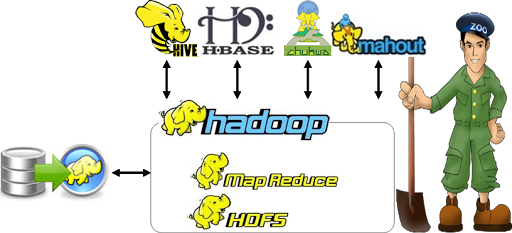
Apache Hadoop, at its core, consists of 2 sub-projects – Hadoop MapReduce and Hadoop Distributed File System. Hadoop MapReduce is a programming model and software framework for writing applications that rapidly process vast amounts of data in parallel on large clusters of compute nodes. HDFS is the primary storage system used by Hadoop applications. HDFS creates multiple replicas of data blocks and distributes them on compute nodes throughout a cluster to enable reliable, extremely rapid computations. Other Hadoop-related projects at Apache include Chukwa, Hive, HBase, Mahout, Sqoop and ZooKeeper.

High level architecture of Hadoop Ecosystem

Figure 1: Hadoop Ecosystem Architecture

HDFS

When a dataset outgrows the storage capacity of a single physical machine, it becomes necessary to partition it across a number of separate machines. Filesystems that manage the storage across a network of machines are called distributed filesystems. HDFS is designed for storing very large files with write-once-ready-many-times patterns, running on clusters of commodity hardware. HDFS is not a good fit for low-latency data access, when there are lots of small files and for modifications at arbitrary offsets in the file.

Files in HDFS are broken into block-sized chunks, default size being 64MB, which are stored as independent units.

An HDFS cluster has two types of node operating in a master-worker pattern: a NameNode(the master) and a number of DataNodes (workers). The namenode manages the filesystem namespace. It maintains the filesystem tree and the metadata for all the files and directories in the tree. The namenode also knows the datanodes on which all the blocks for a given file are located. Datanodes are the workhorses of the filesystem. They store and retrieve blocks when they are told to (by clients or the namenode), and they report back to the namenode periodically with lists of blocks that they are storing.

MapReduce

MapReduce is a framework for processing highly distributable problems across huge datasets using a large number of computers (nodes), collectively referred to as a cluster. The framework is inspired by the map and reduce functions commonly used in functional programming.

In the “Map” step, the master node takes the input, partitions it up into smaller sub-problems, and distributes them to worker nodes. The worker node processes the smaller problem, and passes the answer back to its master node. In the “Reduce” step, the master node then collects the answers to all the sub-problems and combines them in some way to form the output – the answer to the problem it was originally trying to solve.

There are two types of nodes that control this job execution process: a JobTrackerand a number of TaskTrackers. The jobtracker coordinates all the jobs run on the system by scheduling tasks to run on tasktrackers. Tasktrackers run tasks and send progress reports to the jobtracker, which keeps a record of the overall progress of each job. If a task fails, the jobtracker can reschedule it on a different tasktracker.

Figure 2: MapReduce Architecture

Chukwa

Chukwa is a Hadoop subproject devoted to large-scale log collection and analysis. Chukwa is built on top of HDFS and MapReduce framework and inherits Hadoop’s scalability and robustness. It has four primary components:

  1. Agents that run on each machine and emit data
  2. Collectors that receive data from the agent and write to a stable storage
  3. MapReduce jobs for parsing and archiving the data
  4. HICC, Hadoop Infrastructure Care Center; a web-portal style interface for displaying data

Flume from Cloudera is similar to Chukwa both in architecture and features. Architecturally, Chukwa is a batch system. In contrast, Flume is designed more as a continuous stream processing system.

Figure 3: Chukwa Architecture

Hive

Apache Hive is a data warehouse infrastructure built on top of Hadoop for providing data summarization, query and analysis.

Using Hadoop was not easy for end users, especially for the ones who were not familiar with MapReduce framework. End users had to write map/reduce programs for simple tasks like getting raw counts or averages.  Hive was created to make it possible for analysts with strong SQL skills (but meager Java programming skills) to run queries on the huge volumes of data to extract patterns and meaningful information. It provides an SQL-like language called HiveQL while maintaining full support for map/reduce. In short, a Hive query is converted to MapReduce tasks.

The main building blocks of Hive are –

  1. Metastore stores the system catalog and metadata about tables, columns, partitions, etc.
  2. Driver manages the lifecycle of a HiveQL statement as it moves through Hive
  3. Query Compiler compiles HiveQL into a directed acyclic graph for MapReduce tasks
  4. Execution Engine executes the tasks produced by the compiler in proper dependency order
  5. HiveServer provides a Thrift interface and a JDBC / ODBC server
Figure 4: Hive Architecture

HBase

As HDFS is an append-only filesystem, the need for modifications at arbitrary offsets arose quickly. HBase is the Hadoop application to use when you require real-time read/write random-access to very large datasets. It is a distributed column-orienteddatabase built on top of HDFS. HBase is not relational and does not support SQL, but given the proper problem space, it is able to do what an RDBMS cannot: host very large, sparsely populated tables on clusters made from commodity hardware.

HBase is modeled with an HBase master node orchestrating a cluster of one or more regionserver slaves. The HBase master is responsible for bootstrapping a virgin install, for assigning regions to registered regionservers, and for recovering regionserver failures. The regionservers carry zero or more regions and field client read/write requests.

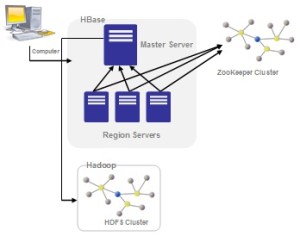
HBase depends on ZooKeeper and by default it manages a ZooKeeper instance as the authority on cluster state. HBase hosts vital information such as the location of the root catalog table and the address of the current cluster Master. Assignment of regions is mediated via ZooKeeper in case participating servers crash mid-assignment.

Figure 5: HBase Architecture

Mahout

The success of companies and individuals in the data age depends on how quickly and efficiently they turn vast amounts of data into actionable information. Whether it’s for processing hundreds or thousands of personal e-mail messages a day or divining user intent from petabytes of weblogs, the need for tools that can organize and enhance data has never been greater. Therein lies the premise and the promise of the field of machine learning.

How do we easily move all these concepts to big data? Welcome Mahout!

Mahout is an open source machine learning library from Apache. It’s highly scalable. Mahout aims to be the machine learning tool of choice when the collection of data to be processed is very large, perhaps far too large for a single machine. At the moment, it primarily implements recommender engines (collaborative filtering), clustering, and classification.

Recommender engines try to infer tastes and preferences and identify unknown items that are of interest. Clustering attempts to group a large number of things together into clusters that share some similarity. It’s a way to discover hierarchy and order in a large or hard-to-understand data set. Classification decides how much a thing is or isn’t part of some type or category, or how much it does or doesn’t have some attribute.

Figure 6: Mahout Architecture

Sqoop

Loading bulk data into Hadoop from production systems or accessing it from map-reduce applications running on large clusters can be a challenging task. Transferring data using scripts is inefficient and time-consuming.

How do we efficiently move data from an external storage into HDFS or Hive or HBase? Meet Apache Sqoop. Sqoop allows easy import and export of data from structured data stores such as relational databases, enterprise data warehouses, and NoSQL systems. The dataset being transferred is sliced up into different partitions and a map-only job is launched with individual mappers responsible for transferring a slice of this dataset.

Figure 7: Sqoop Architecture

ZooKeeper

ZooKeeper is a distributed, open-source coordination service for distributed applications. It exposes a simple set of primitives that distributed applications can build upon to implement higher level services for synchronization, configuration maintenance, and groups and naming.

Coordination services are notoriously hard to get right. They are especially prone to errors such as race conditions and deadlock. The motivation behind ZooKeeper is to relieve distributed applications the responsibility of implementing coordination services from scratch.

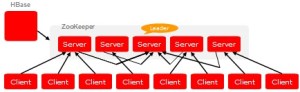
Figure 8: ZooKeeper Architecture

ZooKeeper allows distributed processes to coordinate with each other through a shared hierarchical namespace which is organized similarly to a standard file system. The name space consists of data registers – called znodes, and these are similar to files and directories. ZooKeeper data is kept in-memory, which means it can achieve high throughput and low latency numbers.

This article is published at CloudStory - Part 1, Part 2 & Part 3

Posted in Technical | Tagged , , , , , , , , , , , , | Leave a comment

Solr in AWS: Shards & Distributed Search

Solr is the popular, blazing fast open source enterprise search platform from the Apache Lucene project. Its major features include powerful full-text search, hit highlighting, faceted search, database integration, and geospatial search. It is highly scalable, providing distributed search and index replication.

Documents are indexed into Solr thereby making them searchable. The problem is 2-fold as the size of the Solr index increases: (a) index becomes too large to fit on a single system and (b) a single query takes too long to execute. One solution is sharding.

Sharding is the process of breaking a single logical index in a horizontal fashion across records. It is a common database scaling strategy when you have too much data for a single database. In Solr terms, sharding is breaking up a single Solr core across multiple Solr servers. Solr has the ability to take a single query and break it up to run over multiple Solr shards, and then aggregate the results together into a single result set.

Fig 1: Solr Shards Architecture

This isn’t a completely transparent operation though. The key constraint is when indexing the documents you need to decide which Solr shard gets which documents. Solr doesn’t have any logic for distributing indexed data over shards. Then when querying for data, you supply a shards parameter that lists which Solr shards to aggregate results from. Lastly, every document needs a unique key (ID), because you are breaking up the index based on rows, and these rows are distinguished from each other by their document ID.

Setting up Solr in the Cloud

  • Launch an Amazon EC2 Linux instance with Java installed
  • Download Solr latest stable release
  • Unzip the Solr release and change the working directory to be the “example” directory
user@solr:/opt$ unzip apache_solr_3.3.0.zip
user@solr:/opt$ cd apache_solr_3.3.0/example

Copy the (multi-core supported) SolrHome directory, which contains the schema and config files, into this instance under /user/home

Start the Solr server by specifying the solr-home directory.

user@solr:/opt/apache_solr_3.3.0/example$ java –Dsolr.solr.home=/user/home/SolrHome –jar start.jar

Your solr server is up and running. Let’s consider that the Public URL for the solr server is:  http://ec2-174-129-98-167.compute-1.amazonaws.com:8983/solr/businessentities

Repeat the above steps again to launch a similar instance with a Public URL say http://ec2-175-130-99-168.compute-1.amazonaws.com:8983/solr/businessentities

We now have 2 Solr shards running in the Cloud!

Initializing the Solr shards

Let’s use Solrj, a java client to access Solr. It offers a java interface to add, update, and query the index.

public class SolrShards {
   private final int NO_OF_SHARDS = 2;
   private CommonsHttpSolrServer[] solrServerShard = null;

   public SolrShards () {
      String[] solrShardLocations = {" http://ec2-174-129-98-167.compute-1.amazonaws.com:8983/solr/businessentities ", " http://ec2-175-130-99-168.compute-1.amazonaws.com:8983/solr/businessentities "};
      try {
         solrServerShard = new CommonsHttpSolrServer[NO_OF_SHARDS];
         for (int i = 0; i < solrShardLocations.length; i++) {
            solrServerShard[i] = new CommonsHttpSolrServer(solrShardLocations[i]);
            ((CommonsHttpSolrServer)solrServerShard[i]).setParser(new XMLResponseParser());
         }
      }
      catch (MalformedURLException e) {
      }
   }
   ...
}

Indexing documents into shards

As mentioned above, Solr doesn’t have any logic for distributing indexed data over shards. uniqueId.hashCode() % numServers determines which server a document should be indexed at.

solrServerShard[businessEntity.getId().hashCode() % NO_OF_SHARDS].addBean(businessEntity);
solrServerShard[businessEntity.getId().hashCode() % NO_OF_SHARDS].commit();

Distributed Search: Searching across shards

The ability to search across shards is built into the query request handlers. You do not need to do any special configuration to activate it. In order to search across two shards, you would issue a search request to Solr, and specify in a shards URL parameter a comma delimited list of all of the shards to distribute the search across. You can issue the search request to any Solr instance, and the server will in turn delegate the same request to each of the Solr servers identified in the shards parameter. The server will aggregate the results and return the standard response format.

public class SolrShards {
   …
   private CommonsHttpSolrServer getSolrServer () {
      String solrLocation = "http://ec2-174-129-98-167.compute-1.amazonaws.com:8983/solr/businessentities";
      CommonsHttpSolrServer solrServer = null;
      try {
         solrServer = new CommonsHttpSolrServer(solrLocation);
         ((CommonsHttpSolrServer)solrServer).setParser(new XMLResponseParser());
      }
      catch (MalformedURLException e) {
      }
      return solrServer;
   }
}

public void QueryBusinessEntities() {
   SolrServer solrServer = getSolrServer ();
   SolrQuery query = new SolrQuery();
   query.setParam("shards", "ec2-174-129-98-167.compute-1.amazonaws.com:8983/solr/businessentities, ec2-175-130-99-168.compute-1.amazonaws.com:8983/solr/businessentities");
   query.setQuery("address:India");
   query.addSortField("profit", SolrQuery.ORDER.asc);
   QueryResponse rsp = solrServer.query(query);
   …
}

That’s it! You have set up 2 Solr shards on 2 different machines and performed distributed search successfully.

Caveats:

  • Documents must have a unique key and the unique key must be stored (stored=”true” in schema.xml)
  • The unique key field must be unique across all shards.
  • You typically only need sharding when you have millions of records of data to be searched.
  • If running a single query is fast enough, and if you are looking for capacity increase to handle more users, then use the index replication approach instead!

Solr Standalone v/s Solr Shards – Performance Comparison

In the first test that I carried out, the performance of indexing was measured. From Table 1, it is observed that on an average it needed 1 hour to index 1 million records. But the point to notice is that when shards were used, twice the amount of data was indexed in the same time. (Standalone = 3.5 million, Shards = 8 million)

Table 1: Indexing Time

The second test pertains to measuring the performance of query response times. As you can see from Table 2, there is no observable difference in query response times for stand alone as well as sharded servers though the shards contained twice the amount of data.

Table 2: Query Response Times

References –

1. http://wiki.apache.org/solr/DistributedSearch
2. http://www.amazon.com/Solr-1-4-Enterprise-Search-Server/dp/1847195881

Posted in Technical | Tagged , , , , | Leave a comment

Alfresco: Configure various features

Audits

1. Open <ALFRESCO_HOME>/tomcat/shared/classes/alfresco-global.properties & add the following –

### Audits ###
audit.enabled=true
audit.alfresco-access.enabled=true
audit.alfresco-access.sub-actions.enabled=true
audit.filter.alfresco-access.default.enabled=true
audit.filter.alfresco-access.transaction.user=~null;.*
audit.filter.alfresco-access.transaction.type=cm:folder;cm:content;st:site
audit.filter.alfresco-access.transaction.path=~/sys:archivedItem;~/ver:;.*

2. Download audit-dashlet-0.43.jar

wget http://share-extras.googlecode.com/files/audit-dashlet-0.43.jar

3. Copy audit-dashlet-0.43.jar into <ALFRESCO_HOME>/tomcat/shared/lib folder

4. Login as admin and add the audit dashlet on the dashboard.

Clustering

1. Make a copy of ehcache-custom.xml.sample.cluster as ehcache-custom.xml

cp <ALFRESCO_HOME>/tomcat/shared/classes/alfresco/extension/ehcache-custom.xml.sample.cluster <ALFRESCO_HOME>/tomcat/shared/classes/alfresco/extension/ehcache-custom.xml

2.  Open <ALFRESCO_HOME>/tomcat/shared/classes/alfresco-global.properties & add the following –

### Clustering ###
index.recovery.mode=AUTO
dir.contentstore=${dir.root}/contentstore
dir.contentstore.deleted=${dir.root}/contentstore.deleted
dir.auditcontentstore=${dir.root}/audit.contentstore
alfresco.cluster.name=my-alfresco-cluster
alfresco.tcp.initial_hosts=<Machine1_IP>[7800],...
alfresco.jgroups.defaultProtocol=TCP
dir.indexes=${dir.root}/lucene-indexes
dir.indexes.backup=${dir.root}/backup-lucene-indexes
dir.indexes.lock=${dir.root}/locks

Please note that the attribute alfresco.cluster.name should have a value.

S3 Connector Integration

1. Download alfresco-s3-connector-1.0.0-5.amp

2. Copy the .amp file into amps folder

cp alfresco-s3-connector-1.0.0-5.amp <ALFRESCO_HOME>/amps

3. Run the apply_amps.sh script to install the .amp file

./apply_amps.sh

4. Check if the .amp is installed properly

java -jar alfresco-mmt.jar list <ALFRESCO_HOME>/tomcat/webapps/alfresco.war

5. Open <ALFRESCO_HOME>/tomcat/shared/classes/alfresco-global.properties & add the following –

### S3 Integration ###
s3.accessKey=<S3_ACCESS_KEY>
s3.secretKey=<S3_SECRET_KEY>
s3.bucketName=<S3_BUCKET_NAME>

Replication via HTTPS / SSL

Refer Alfresco – Replication HOWTO on how to set up replication

1. Open <ALFRESCO_HOME>/tomcat/bin/catalina.sh and add the following –

JAVA_OPTS="$JAVA_OPTS -Djavax.net.ssl.trustStore=<ALFRESCO_HOME>/alf_data/keystore/ssl.truststore -Djavax.net.ssl.trustStorePass=kT9X6oe68t -Djavax.net.ssl.trustStoreType=JCEKS"
Posted in Technical | Tagged , , , , , , , | Leave a comment

Alfresco – Replication HOWTO

In EVERY Alfresco instance, follow these steps –

1. In order to find out the repositoryId, use the following command –
curl -uadmin “http://<ip_address>:<port>/alfresco/s/cmis” | grep cmis:repositoryId

2. Open <ALFRESCO_HOME>/tomcat/shared/classes/alfresco-global.properties and add the following –

### Replication ###
replication.transfer.readonly=true

3. Open <ALFRESCO_HOME>/tomcat/shared/classes/alfresco/web-extension/share-config-custom.xml and add the following –

<config evaluator=”string-compare” condition=”Replication”>
      <share-urls>
         <share-url repositoryId=”<remote_repository_id>”>http://<remote_ip_address&gt;:<port>/share/</share-url>
      </share-urls>
   </config>


In EVERY Alfresco instance, follow these steps –

User Creation


1.      Login as admin

2.      Click on More àUsers

3.      Click on “New User”

4.      Fill the form

Notes:

a.       Every user must have the SAME “User Name” in each region.

b.      Ensure that users are created MANUALLY BEFORE setting up replication.


Site Creation

1.      Login as admin / non-admin user

2.      Click on Sites àCreate Site

3.      Fill the form


Notes:

a.       Every site must have the SAME “Name” in each region and must be created by the same user.

b.      Ensure that sites are created MANUALLY BEFORE setting up replication.


Set up Transfer Target

1.      Login as admin

2.      Go to Data Dictionary àTransfers àTransfer Target Group àDefault Group

3.      Click on “New Folder”

4.      Fill the form

a.       Name = ReplicationUS2SG (say)

5.      Click on “Edit Properties” for the folder ReplicationUS2SG and fill the form appropriately.

a.       Endpoint Host = <address of the target server>

b.      Endpoint Port = 8080 (non-ssl), 8443 (ssl)

c.       Endpoint Path = /alfresco/service/api/transfer

d.      Endpoint Protocol = http (non-ssl), https (ssl)

e.       Username = <admin username of the target server>

f.        Password = <admin password of the target server>

g.       Check Enabled

 
In order to enable SSL-based replication on port 8443, add the following line in /opt/alfresco-4.0.1/tomcat/bin/catalina.sh –

JAVA_OPTS=”$JAVA_OPTS -Djavax.net.ssl.trustStore=<$ALFRESCO_HOME>/alf_data/keystore/ssl.truststore -Djavax.net.ssl.trustStorePass=kT9X6oe68t -Djavax.net.ssl.trustStoreType=JCEKS”

Note: As mentioned earlier, please ensure that users and sites are present in every region before setting up replication jobs.


Set up a Replication Job

1.      Login as admin

2.      Click on More àReplication Jobs

3.      Click on “Create Job”

4.      Fill the form appropriately

a.       Select the appropriate Source Items

b.      Select the appropriate Transfer Target

c.       Check Enabled

d.      If required, check Schedule Job and select an appropriate interval


Run a Replication Job

1.      Select the job and click “Run Job”.


Posted in Uncategorized | Leave a comment